The GitHub App is the recommended setup, and assert-local works if you can’t install it. You can also connect with a GitHub personal access token.

Create and save a token

  1. In Assert, open Account settings → GitHub access → Personal Access Token.
  2. Choose Generate Personal Access Token. The link opens GitHub’s classic-token setup with the repo and read:org scopes selected.
  3. Generate the token on GitHub, paste it into Assert, and choose Save.
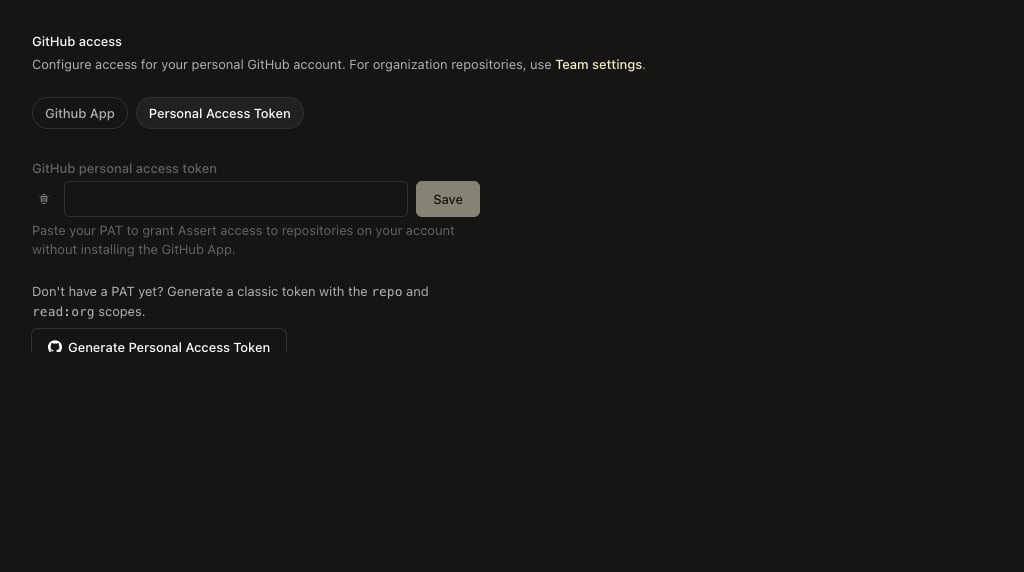
The Personal Access Token tab in Assert's GitHub access settings, with an empty token field Use a token from the GitHub account that has access to your repositories. This connects your account without installing the app; webhook updates still require the GitHub App.

Personal and organization access

A token is saved to your Assert account, not to a workspace. It gives you access to the repositories your GitHub account can reach, including organization repositories you’re a member of, but it doesn’t connect them for your teammates. To connect an organization’s repositories for the whole team, install the GitHub App and manage it in Team settings, as the settings page notes. If your organization uses SAML SSO, authorize the token for that organization on GitHub. Organization policies can also restrict classic tokens. See GitHub’s token documentation for expiration, SSO authorization, and revocation.

Update an expired or revoked token

Create a replacement with the same scopes and save it in Account settings → GitHub access → Personal Access Token. If a repository still doesn’t load, check the token’s account, scopes, expiration, and organization access.